
























































A Closer Look at the New WorkQueue Experience with Zoho CRM Update
The introduction of WorkQueue by Zoho CRM has been a major productivity upgrade. This feature simplifies how teams manage their workloads. WorkQueue streamlines the process, reducing the stress teams traditionally faced while switching between Leads, Deals, Activities, Approvals, or custom modules.
The rollout of this new feature pulls everything into one clean workspace. Users who spend hours every day inside the Zoho CRM can experience a better workflow. WorkQueue removes a lot of unnecessary navigation, helping teams stay in a single place to focus, act, and follow through.
What Exactly is WorkQueue?
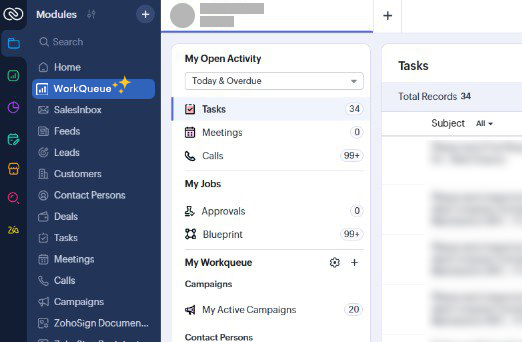
WorkQueue is a centralized action hub inside Zoho CRM. It gathers your pending tasks, meetings, calls, approvals, and workflow-driven jobs into a unified dashboard.
Whether you’re following up on a high-value deal or moving a record through a blueprint stage, WorkQueue lays everything out in a structured interface that you can easily scan. The idea is to bring your work to one place, so that you spend more time on your priorities and less time searching.
Why This Update Matters
Anyone who has managed sales operations knows how scattered CRM responsibilities can get. Tasks are located on one module, approvals in another, and blueprint transitions are often concealed behind layers of automation. With WorkQueue, Zoho CRM reduces this fragmentation by offering:
- A single view to deal with everything that needs attention
- Real-time visibility into assigned records and activities
- A cleaner workflow based on priority to plan your day
Instead of juggling tabs or missing follow-ups, users get a dashboard that mirrors the actual flow of their workday.
Key Highlights of the New WorkQueue
1. My Activities
All your tasks, calls, meetings, and overdue items appear in one list. These are grouped and coded with colors, so that you instantly know what needs attention.
2. My Jobs
This section keeps workflow approvals, blueprint transitions, system-assigned tasks, and other automated jobs neatly organized.
3. Custom Workqueues
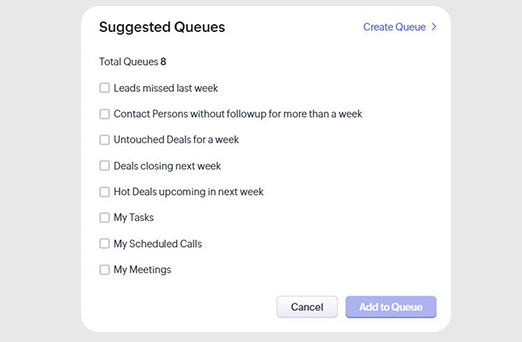
You can build your own personalized queues using module filters or criteria. This feature proves helpful for sales teams that work in specialized pipelines.
4. Quick Actions
If you need to create a follow-up task or schedule a meeting, WorkQueue allows you to do it inside it without the need for any other module.
5. Manager View
Team leads get a real-time picture of team workload, pending approvals, and turnaround performance, making WorkQueue just as valuable for leadership. The feature is available across all paid editions of Zoho CRM. This makes it accessible to teams of different sizes.
How Xponential Digital Supports Businesses Using Zoho CRM
As companies adopt tools like WorkQueue, they often need help aligning their CRM processes, automation logic, and reporting with real business goals. Xponential Digital helps organizations implement, customize, and optimize Zoho CRM. Professional assistance ensures that features like WorkQueue deliver maximum efficiency. You may need support for workflow design, data migration, user training, or CRM modernization. In any case, the seasoned team keeps your system working to streamline your operations.







 Xponential Digital