



















































How to use Zoho CRM to build Smarter, Data-Driven Kiosk Experiences
Kiosks within Zoho CRM have always been useful for guiding users through detailed steps. The challenge, however, has always been control. In many workflows, several actions ran in parallel. Records were created, tasks were triggered, webhooks were fired, but the next screen did not necessarily “wait” for those actions to finish. As a result, responses from one step were not always available in the next.
For businesses designing process-heavy workflows, that gap can significantly impact efficiency.. Sequential actions in Kiosk Studio address this challenge directly. Instead of allowing actions to execute independently, the kiosk can now pause until an action completes,then use its output in the following screen. As a result, operations teams get a more connected, dependable flow that behaves the way they expect.
Why Sequential Control Matters
Let’s look at a common use case. A kiosk screen creates a new lead. In many systems, the lead is created in the background while the user moves forward. With sequential actions enabled, the kiosk waits for confirmation that the lead exists before proceeding.
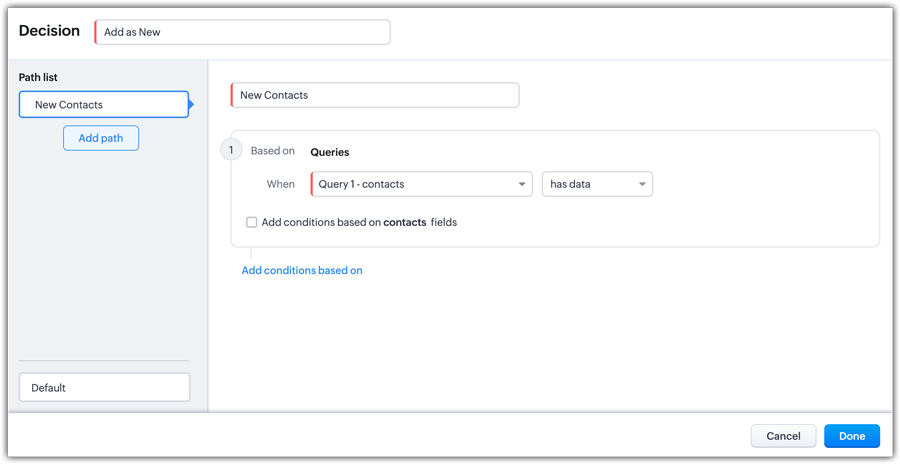
That confirmation brings in other possibilities. The next screen can immediately schedule a meeting for the new lead, assign a task to the owner, or use the created record inside a decision component. There is no need for manual reconfiguration or external references. The output from the first action becomes usable data in the next step.
This may sound technical, but operationally, it simplifies process design. Teams can build flows that react to real-time results instead of relying on assumed outcomes.
Practical Enhancements for Real Workflows
The “Wait for Completion” toggle largely defines its capability. Once enabled, the kiosk ensures that actions such as creating records, triggering webhooks, executing functions, or logging activities are completed before users move forward. If it is not enabled, actions continue to run in parallel, and their responses cannot be reused.
Another practical addition is the path of optional failure. If an action fails due to a timeout or execution error, the kiosk can branch into a defined fallback route. This gives administrators control over handling errors rather than leaving users uncertain about what happened.
Teams also benefit from improved visibility into records created within the kiosk. Newly created records can now be accessed under CreatedRecords, grouped within a unified KioskRecords section that includes GetRecords and CurrentRecords. This consolidation reduces the complexity of configuration and keeps the references of records organized.
Kiosk Fields further streamline the setup by combining screen fields and action fields into one accessible area. Instead of switching between sections, administrators can configure inputs and outputs from a single place.
Technical Guardrails to Be Aware Of
Sequential actions support up to three webhooks or functions between screens. The execution wait time for webhooks and Deluge functions is capped at 10 seconds. If an action exceeds this duration or encounters errors like timeouts, it is treated as failed and redirected to the configured failure path. Responses must be in JSONObject format, as JSONArray outputs are not supported in this context.
These specifications function less as limitations and more as structured design parameters. They ensure stability in performance while improving control significantly.
Designing with Confidence in Zoho CRM
Sequential actions make kiosks in Zoho CRM more reliable and context-aware. Instead of stitching together fragmented steps, organizations can build guided experiences where each action informs the next.
For companies working with a Zoho Advanced Partner, these capabilities open doors to more intelligent automation. A dedicated team of professionals can structure kiosk flows that align tightly with operational goals, ensuring that functions, webhooks, and record updates work in proper sync.
Why Choose Xponential Digital?
As a Zoho Advanced Partner, Xponential Digital helps businesses design structured, scalable CRM workflows that reflect real operational needs. From configuring sequential actions to optimizing complex kiosk journeys, our team prioritizes precision, control, and measurable efficiency inside Zoho CRM.







 Xponential Digital